A probability curve is not the data
Building probviz taught me that a probability curve is only a model until samples, fits, and uncertainty put it under pressure.
A probability distribution is usually introduced as a formula and remembered as a silhouette. That is a poor way to learn one. The useful question is not only “what is the density?” It is: what does the density look like, what samples does it produce, what parameters control it, and does it describe the data in front of me?
I built probviz to keep those questions together. It is a typed Python library and a Streamlit explorer for probability distributions, sampling, fitting, dependence, Monte Carlo, and statistical tests. It is now published on PyPI, with source on GitHub and documentation on GitHub Pages.
Start with a shape, not a formula
The first thing the app should do is make a parameter feel physical. Increase the standard deviation of a normal distribution and the curve gets wider and lower. Decrease it and probability gathers around the mean. The formula has not changed; the relationship between its parameters and its shape has become visible.
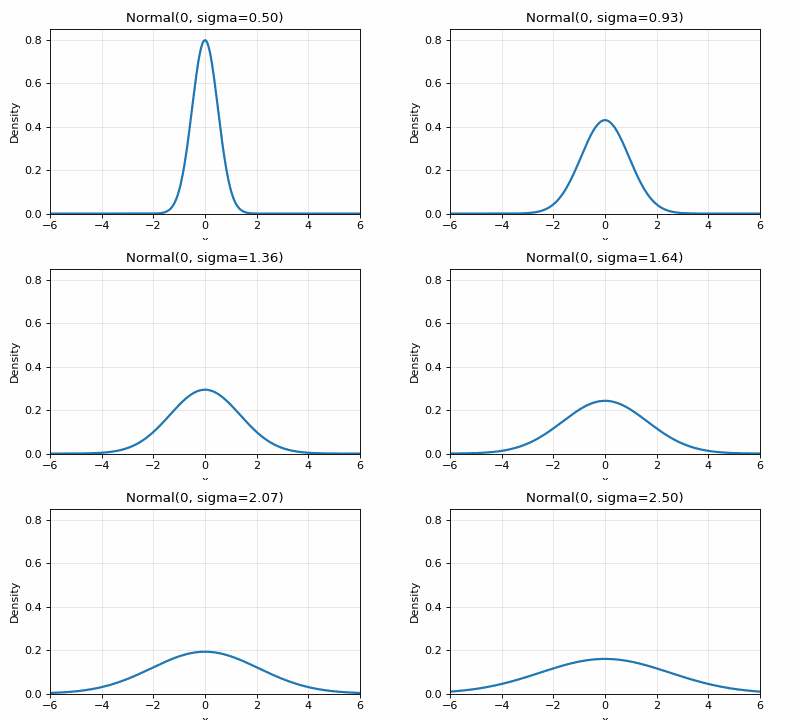
For a normal distribution with mean and standard deviation , the density is:
The equation says exactly what the animation shows: changing the spread changes both the height and width of the density while leaving its centre in place. In the API, that parameter is called sigma, and it must be positive.
The distinction matters because this is a model, not a record of observations. A curve tells us what the model expects. A sample tells us one way reality could look under that model.
Three views of one model
The app shows a probability law through three related views. For a discrete variable, a bar is a probability:
For a continuous variable, the height is density, not probability. Probability is the area under the curve:
Both views connect to the cumulative distribution function and its quantile operation:
That maps directly to the library:
| Mathematical view | probviz operation |
|---|---|
| Density or mass | distribution.pdf(x) |
| Cumulative probability | distribution.cdf(x) |
| Quantile | distribution.ppf(q) |
| Draws from the model | distribution.rvs(...) |
For a normal distribution, cdf(1.96) is approximately 0.975. For a discrete distribution such as Binomial, pdf(5) is the probability of exactly five successes. The same public method is convenient; the interpretation is different.
Sixteen distributions, one contract
The library starts with 16 univariate distributions: 10 continuous and 6 discrete. Each is a small validated wrapper around a frozen SciPy distribution. The wrapper gives them the same useful vocabulary: pdf, cdf, ppf, rvs, mean, var, std, median, mode, skewness, kurtosis, entropy, get_support(), and interval.
from src.distributions.continuous import NormalDistribution

normal = NormalDistribution(mu=0, sigma=1)

print(normal.pdf(0))
print(normal.cdf(1.96))
print(normal.ppf(0.5))
print(normal.rvs(size=1_000, random_state=0).mean())
The parameter layer matters as much as the plotting layer. A slider must not be able to create sigma = 0, an invalid beta shape, or a uniform distribution whose upper endpoint comes before its lower endpoint. Every class exposes get_parameters(), get_parameter_bounds(), and set_parameters() so the app can build its controls from the distribution itself rather than maintaining a second, drifting registry of rules.
The continuous set is Normal, Exponential, Uniform, Beta, Gamma, Chi-Square, Student-t, Weibull, Lognormal, and Cauchy. The discrete set is Binomial, Poisson, Geometric, Negative Binomial, Hypergeometric, and Discrete Uniform. A discrete distribution’s pdf dispatches to its PMF, so the public call still works while the plot can use bars instead of pretending a count distribution is smooth.
Shape has more than one parameter
The beta distribution is a good test of whether a visualizer is doing anything useful. Its support stays fixed at the interval from zero to one, but its two shape parameters can produce a uniform-looking curve, a central peak, a skewed tail, or mass pressed against a boundary.
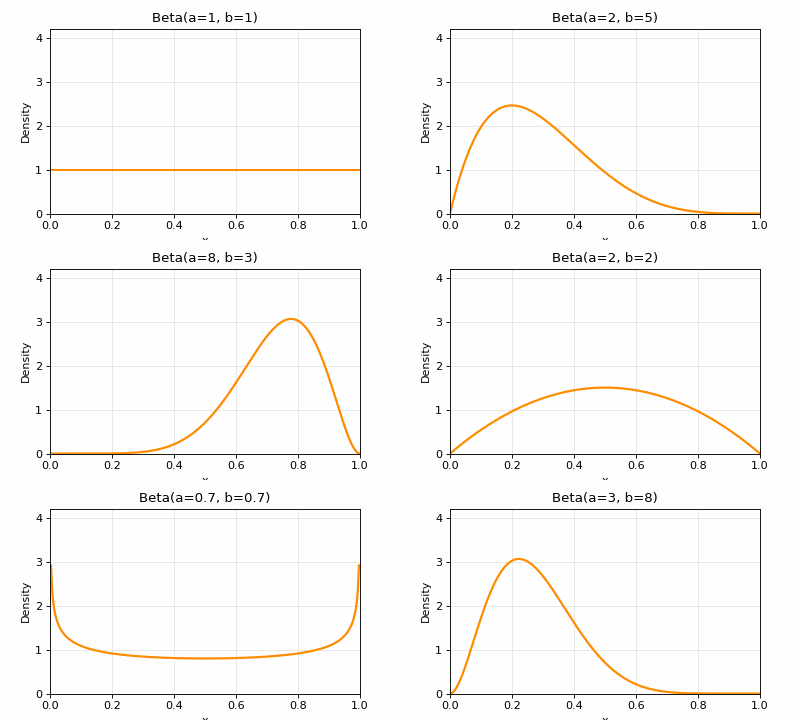
The beta density is more legible when its normalising constant is separated from its shape terms:
This is also why the app keeps statistics beside the plot. A curve can look “more concentrated” while its mean stays fixed, or move its mean while its variance changes in a less obvious way. The app renders mean, variance, standard deviation, median, mode, skewness, and excess kurtosis together, then exposes quantiles through ppf.
Sampling is where the picture gets tested
The curve is theoretical. A sample is noisy. The central limit theorem is the bridge between them: take independent observations with finite variance, average more of them, and the distribution of those averages approaches a normal law.
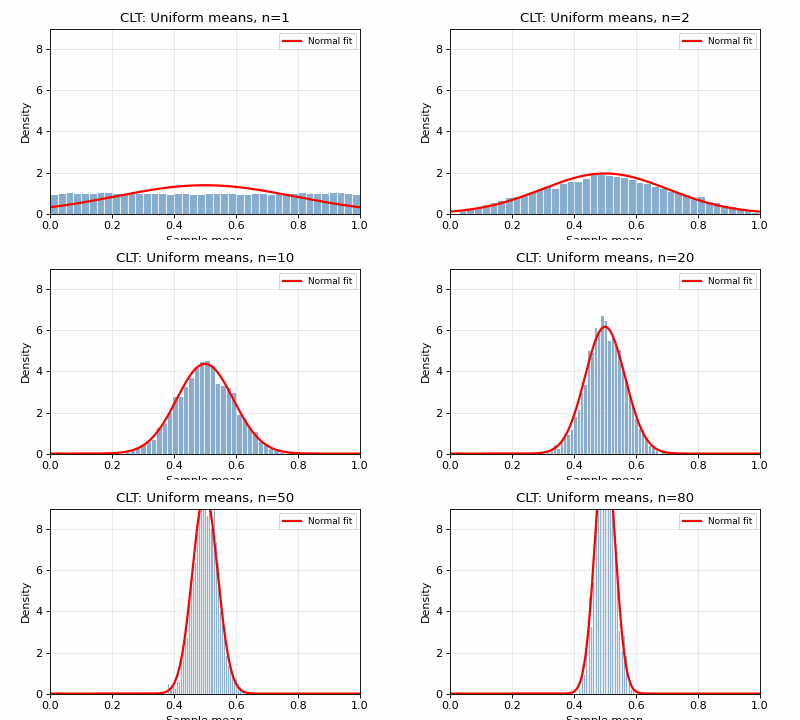
The library keeps random generation explicit and reproducible:
from src.distributions.continuous import GammaDistribution

gamma = GammaDistribution(shape=2, scale=2)
sample = gamma.rvs(size=10_000, random_state=7)

print(sample.mean())
print(gamma.mean())
The random_state belongs to the call. Sampling one distribution should not silently reseed a different part of a notebook or test process. That explicit-seed rule was one of the changes made during the production audit: the public samplers and fitting paths accept a seed where they control randomness, while arbitrary callables remain responsible for their own generator.
Dependence is invisible in a marginal
Two variables can have perfectly ordinary one-dimensional distributions and still have an interesting joint structure. A scatter plot reveals that structure, but a pair of marginals does not. Copulas provide a way to model the dependence separately from the marginals.
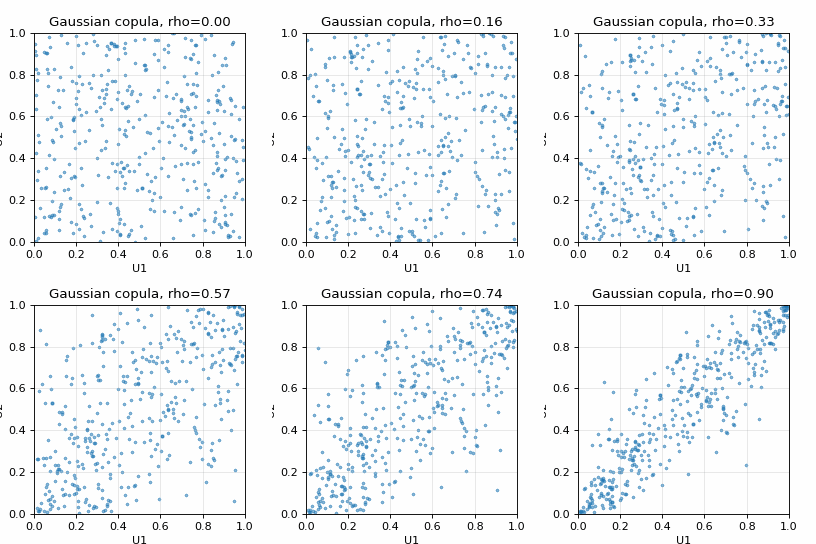
The fitting path is rank-based: turn observations into pseudo-observations, estimate dependence, then sample in the unit square. In mathematical form, the Gaussian copula density is:
import numpy as np
from src.distributions.copulas import GaussianCopula

correlation = np.array([[1.0, 0.75], [0.75, 1.0]])
copula = GaussianCopula(correlation=correlation)

u = copula.rvs(size=2_000, random_state=0)
print(u.shape)
print(u.min(), u.max())
probviz includes Gaussian, Clayton, Gumbel, and Student-t copulas. The limitations are intentional and visible in the API: Clayton and Gumbel density and sampling methods are bivariate-only; the Student-t copula exposes sampling while its density and CDF explicitly direct users toward Monte Carlo. A limitation that raises clearly is more useful than an implementation that returns a plausible-looking wrong answer.
Mixtures: when one curve is not enough
If a dataset contains two populations, fitting one normal distribution can hide the structure. A mixture represents several component distributions and weights their densities:
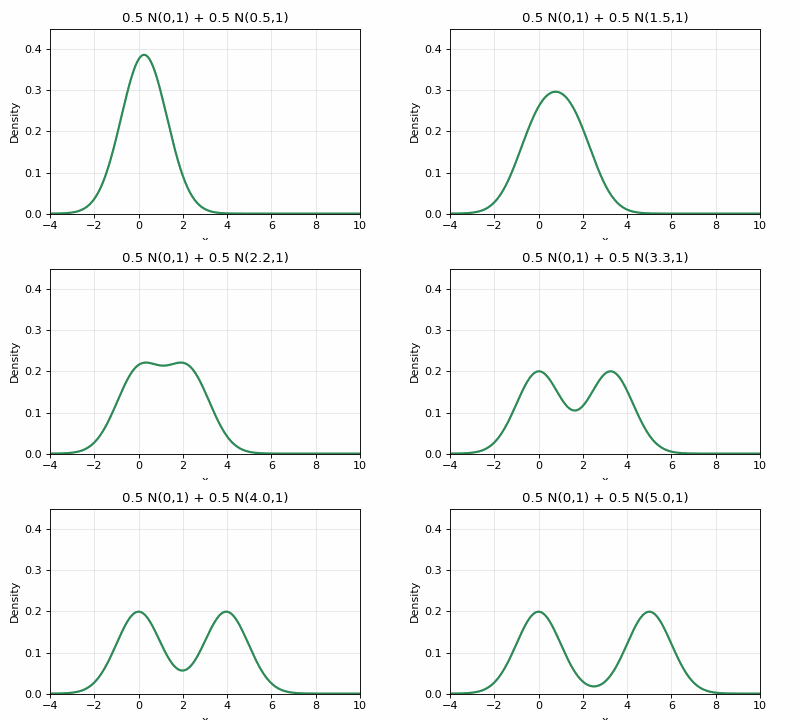
The implementation includes a one-dimensional EM fitter, a scikit-learn Gaussian-mixture wrapper, Bayesian GMM, and BIC-based component selection. The EM implementation is guarded at the places where numerical examples usually become production bugs: empty data, too many components, zero row likelihoods, zero component counts, and zero variance. The fitter evaluates convergence after updating the parameters, so its stopping decision corresponds to the latest M-step rather than the previous iteration.
import numpy as np
from src.distributions.mixtures import GaussianMixtureModel

rng = np.random.default_rng(4)
data = np.concatenate([
    rng.normal(-2, 0.6, 300),
    rng.normal(2, 0.8, 300),
])

model = GaussianMixtureModel(n_components=2)
model.fit(data)

print(model.get_parameters())
print(model.bic(data))
The distinction between the hand-written EM path and the sklearn model is useful. The first makes the algorithm and its failure modes inspectable. The second gives a production-grade multivariate estimator. They share the same idea, not the same abstraction.
From a picture back to data
Visualization becomes analysis when it can answer “which model describes this sample?” DistributionFitter tries ten candidate laws — normal, exponential, gamma, beta, lognormal, Weibull, Student-t, chi-square, uniform, and Cauchy — using maximum likelihood. It reports log likelihood, AIC, BIC, and a KS statistic, then sorts the results by AIC.
import numpy as np
from src.fitting.distribution_fitter import DistributionFitter

data = np.random.default_rng(12).gamma(shape=2, scale=2, size=500)
fitted = DistributionFitter(data).fit_all()

best_name, best_result = next(iter(fitted.items()))
print(best_name)
print(best_result["aic"], best_result["bic"])
The output is a regular dictionary instead of an opaque library-specific result object. That makes it easy to log, serialize, compare, or put behind an API. BayesianEstimator adds conjugate updates for normal means and variances, Poisson rates, and Bernoulli probabilities. GoodnessOfFit wraps chi-square, KS, Anderson-Darling, Shapiro-Wilk, and Jarque-Bera tests.
The important word in “best fit” is best among the candidates tested. AIC and BIC compare those candidates; they do not prove that the winning distribution generated the data. A KS statistic is a distance between an empirical and fitted CDF; it is not a certificate that the model is true. The useful workflow is to inspect the fit, plot the residual disagreement, and ask what data-generating process could make the mismatch.
Monte Carlo is an uncertainty tool
Monte Carlo is often introduced as “draw many samples and average them.” The average is only half the answer. The other half is how uncertain that estimate is and how quickly it stabilises. MonteCarloSimulator returns samples, summary statistics, quantiles, a confidence interval, and optional convergence data. Its probability estimator uses a Wilson interval rather than a symmetric interval that can wander below zero or above one.
The library also includes importance sampling, stratified sampling, bootstrap, permutation tests, antithetic variates, control variates, Halton sequences, and Sobol sequences. The expectation formula is simple:
import numpy as np
from src.monte_carlo.simulator import MonteCarloSimulator

rng = np.random.default_rng(0)
simulator = MonteCarloSimulator(random_seed=0)
result = simulator.simulate(
    lambda: rng.normal(),
    num_samples=10_000,
    track_convergence=True,
)

print(result.mean)
print(result.confidence_interval)
The simulator’s seed is stored on the simulator, but simulate() calls an arbitrary function; that function still owns its random state. Creating a generator outside the callable makes the dependency explicit and avoids coupling a notebook to NumPy’s global RNG. The returned interval is an empirical percentile interval for the generated values; estimate_probability() separately uses a Wilson interval for a binomial proportion. The important point is that an estimate should arrive with uncertainty, not just a number with too many decimal places.
The app is a laboratory, not a dashboard
The Streamlit app is deliberately one page with a sidebar. The sidebar chooses continuous or discrete distributions, creates parameter controls from the distribution’s own bounds, and exposes PDF/PMF, CDF, and sample toggles. The main page places statistics, plots, quantiles, and an optional sample histogram beside one another.
That layout is intentional. A dashboard encourages scanning. A laboratory encourages changing one thing and watching what responds. Move a parameter, compare the curve with its CDF, turn on samples, and then ask whether the empirical mean and quantiles are behaving as the theory predicts.
The app covers the 16 univariate distributions. The advanced modules remain a Python API: multivariate distributions, copulas, mixtures, fitting, Monte Carlo, and statistical tests. That boundary is documented rather than hidden behind half-finished UI controls.
For notebooks and applications, the visualizer functions return figures instead of displaying them:
from src.distributions.continuous import NormalDistribution
from src.visualizers import plot_cdf, plot_comparison, plot_pdf

normal = NormalDistribution(mu=0, sigma=1)
fig, ax = plot_pdf(normal)
fig, ax = plot_cdf(normal, num_points=250)
fig, ax = plot_comparison([normal, NormalDistribution(mu=1, sigma=0.8)])
No helper calls plt.show(). You can embed the returned figure, add annotations, save it, or close it when a web request is finished.
The failures are part of the design
A probability library can produce an attractive wrong answer. That became clear during the production audit. A random mixture fit can change its component labels between runs. An EM iteration can create a zero standard deviation. A copula method can be mathematically defined only in two dimensions, while its input looks general enough to suggest otherwise. A missing guard in any of those places would leave the plot looking reasonable and the result difficult to trust.
The implementation responds by making assumptions executable: random-state arguments are passed into samplers and fitters; empty data, too many components, zero likelihoods, and zero variances are checked; unsupported Student-t copula density and CDF operations raise an explicit NotImplementedError; and tests cover the numerical boundary cases as well as the happy path. These are not separate from the visual design. They are what stop an interactive experiment from turning a bug into a lesson.
Quality is part of the feature
The project began as a visual experiment and ended with the quality gates of a library. The release is built as a wheel and source distribution. The CLI is probviz app, probviz test, and probviz version. The package ships src, web, and tests, so an installed copy can run its own suite when the test extras are installed.
Every push runs Ruff, Black, isort, mypy, the test suite with an 80 percent coverage gate, a dependency audit, a Docker build, and a documentation build. The matrix covers Python 3.10, 3.11, and 3.12. The five GIFs in this article are generated by examples/generate_media.py; they are outputs of the project, not stock assets.
flowchart LR
LAW["distribution law"] --> API["typed Python API"]
API --> VIEW["PDF / CDF / quantiles"]
API --> SAMPLE["reproducible samples"]
SAMPLE --> FIT["fit and test data"]
VIEW --> APP["Streamlit explorer"]
FIT --> APP
API --> EXT["notebook / service / test"]
Try the whole loop
Install the library:
pip install probvizOpen the explorer:
probviz app --server.port 8501Use the API from a notebook or script:
import numpy as np
from src.distributions.continuous import GammaDistribution
from src.fitting.distribution_fitter import DistributionFitter

distribution = GammaDistribution(shape=2, scale=2)
observations = distribution.rvs(size=200, random_state=0)

print("theoretical mean:", distribution.mean())
print("sample mean:", observations.mean())

fits = DistributionFitter(observations).fit_all()
print("best candidate:", next(iter(fits)))
Then install the test extras and run the fixtures yourself:
pip install "probviz[test]"
probviz test
The project is not a replacement for SciPy, and the Streamlit page is not a general-purpose statistical workbench. It is a coherent surface over a set of probability ideas that are usually separated: distributions, dependence, samples, fitting, uncertainty, and tests. Its value is the connection between them.
The thesis is simple: a distribution should be something you can see, perturb, sample from, fit, and question. That is what I tried to make probviz - a library you can import, an app you can drag, and a set of figures that make the mathematics harder to misunderstand.
Further reading
The implementation builds on SciPy’s statistical distributions. For an interactive introduction to probability concepts, Seeing Theory is excellent. The NIST/SEMATECH e-Handbook is a useful reference for distribution fitting, goodness-of-fit, and statistical practice.
The package is on PyPI, the source is on GitHub, and the API documentation is live. Start with pip install probviz, move a slider, and see whether the picture agrees with the formula.
← back to writing